Overview
Defaults.csv is the central configuration file that tells iPool Apollo where to find its resources and how to behave during simulations. Understanding its structure — especially the directory paths — is essential for every simulation you run.
- Required file:
Defaults.csvlocated in your working directory - What this page covers: the three sections of Defaults.csv (Market Parameters, Directory Configuration, Calibration Parameters) and how each affects simulation behavior
- Exercise: open Defaults.csv and verify that the directory paths point to your current working folder
Understanding Defaults.csv
Defaults.csv is the central configuration file that tells iPool Apollo where to find its resources and how the software should behave during simulations. Instead of hardcoding these settings, iPool Apollo reads them each time it starts. This design allows the software to adapt to different project environments without modifying the application itself.
iPool Apollo reads Defaults.csv automatically on startup. Any changes to the file take effect the next time the application is launched.
What Does Defaults.csv Control?
Defaults.csv is organized into three main sections. Use the tabs below to review each section.
- A. Market Parameters
- B. Directory Configuration
- C. Calibration Parameters
Market Parameters
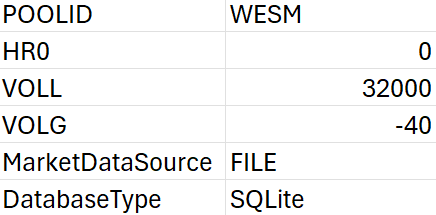
The Market Parameters section defines core simulation behavior. Examples include:
- POOLID — Market Pool ID (e.g.,
WESMfor the Philippine Wholesale Electricity Spot Market) - VOLL — Value of Lost Load (e.g.,
32,000₱/MWh) - VOLG — Value of Lost Generation (e.g.,
-40₱/MWh) - HR0 — Dispatch starting hour
- MarketDat — Market data source (e.g.,
FILEfor file-based market data) - DatabaseT — Database type (e.g.,
MSAccess)
These values influence how the simulation engine models the electricity market.
Normally, the calibration values in Defaults.csv do not need to be changed, as they are primarily used for simulations. However, always verify that the file directory is correct before proceeding.
Exercise
Give it a try and do this exercise:
Step 1 of 3
Open Defaults.csv